
Managing Loyalty on Specific Categories and Products #
Navigate to the Lifelong POS login page #
https://login.lifelongpos.com/ or https://manage.acadiapos.com/login
Access the Customers tab #
Click on the “Customers” tab on the left hand side of the screen.

Click on the Rewards button #

Click the Blue Edit Pencil Icon #

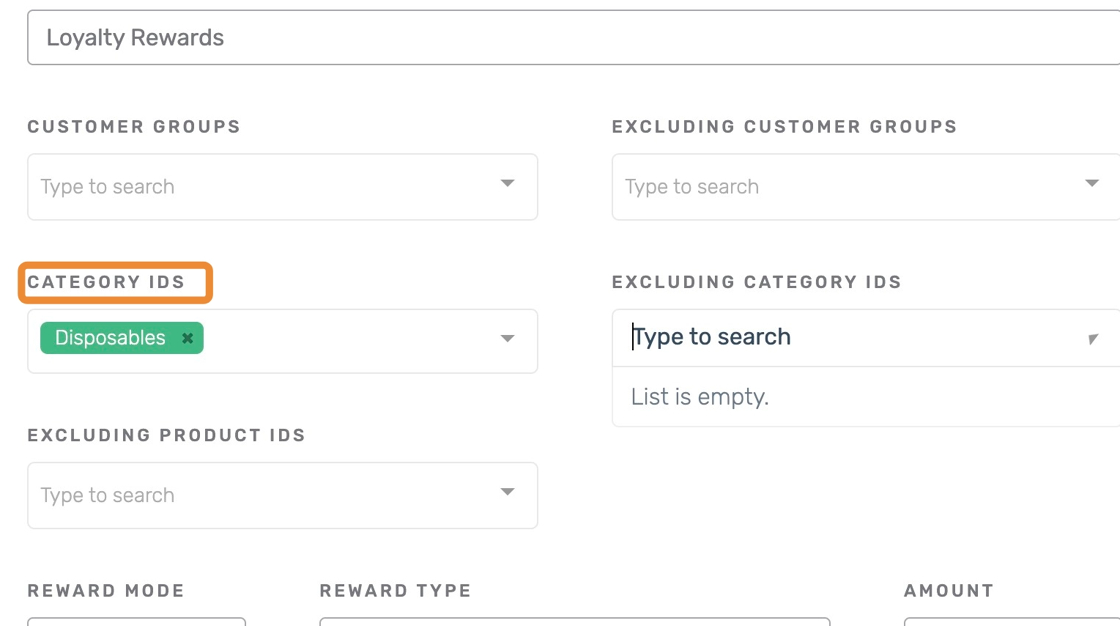
Category IDs #
This setting allows rewards to be earned only on items within the specified categories. If left blank, rewards will be earned on all items.
Excluding Category and Product IDs #
Excluding Category IDs:
This excludes certain categories from earning rewards. All other categories that are not selected will still earn rewards.
Excluding Product IDs:
This excludes specific products from earning rewards. All other products will still be eligible for rewards.

Click Save Changes #

Other related pages #
- Create a New Customer Group in Lifelong POS
- How To Add A New Customer Through The Lifelong Website
- How to Create a New Customer Attribute Field
- Creating a New Loyalty Customer Rewards Program
- Managing Loyalty on Specific Categories and Products


