
Creating Discounts: All Cart Items / Buy X, Get Fixed Amount #
✅ How It Works #
- Trigger condition: Customer must buy at least X items in the cart (across all or selected categories/products).
- Reward: A fixed amount is subtracted from the total cart value, not from individual items.
Create a New Discount Rule #
Follow the step-by-step instructions below to use the “Buy X, Get Fixed Amount” option.
Navigate to Lifelong POS login #
https://login.lifelongpos.com/

Click the “Items” tab on the left #

Click “Price/Discount Rules” at the top right #

Click “New Price/Discount Rule” #

Enter a name for your discount #
Example: “Buy 2 Raz Disposables get $10 Off”

Select “All Cart Items / Buy X, Get Fixed Amount” #

Select Products or Categories #
Use the “Type to search” box under Products to choose specific items or select entire categories. Avoid selecting both simultaneously to prevent conflicts.
If no items are selected, the rule applies to any X products.

Example: Add RAZ LTX Gush White Grape #

Add More Products #
Use the dropdown again to add more items. Here we add another RAZ flavor.

Review and Manage Product List #
Ensure all selected items are listed. Click “X” to remove any unwanted item.

Set “Buy X” Quantity #
Specify the number of items required to trigger the discount. Example: 2 items for $10 off.

Set Discount Amount #
Enter the fixed amount to subtract from the cart total. Example: Enter 10 for $10 off.

Click “Save Changes” #

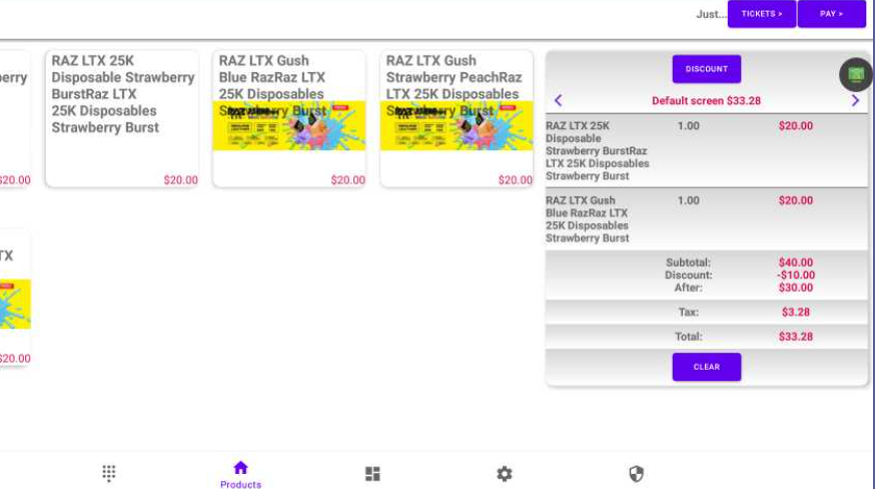
See Discount in POS Cart #
In the cart, the $10 discount will appear under the Discount field once the rule is triggered.
Customize Discount Rule Timing #
- Days of the Week: Choose specific active days.
- Hours of the Day: Restrict to timeframes (e.g., Happy Hour).
- Start & End Dates: Set availability window.
Use these options to control when the discount is active.
Additional Discount Guides #
Explore more guides on setting up price and discount rules in Lifelong POS.


