
How to Refund Cash & Card Transactions or Void Orders on the Lifelong POS Register #
Important Notes #
Alert: Credit Card MUST be present.
Refunds on Credit Card take 5-7 days depending on the customer’s bank.
Access the Sales Tab #
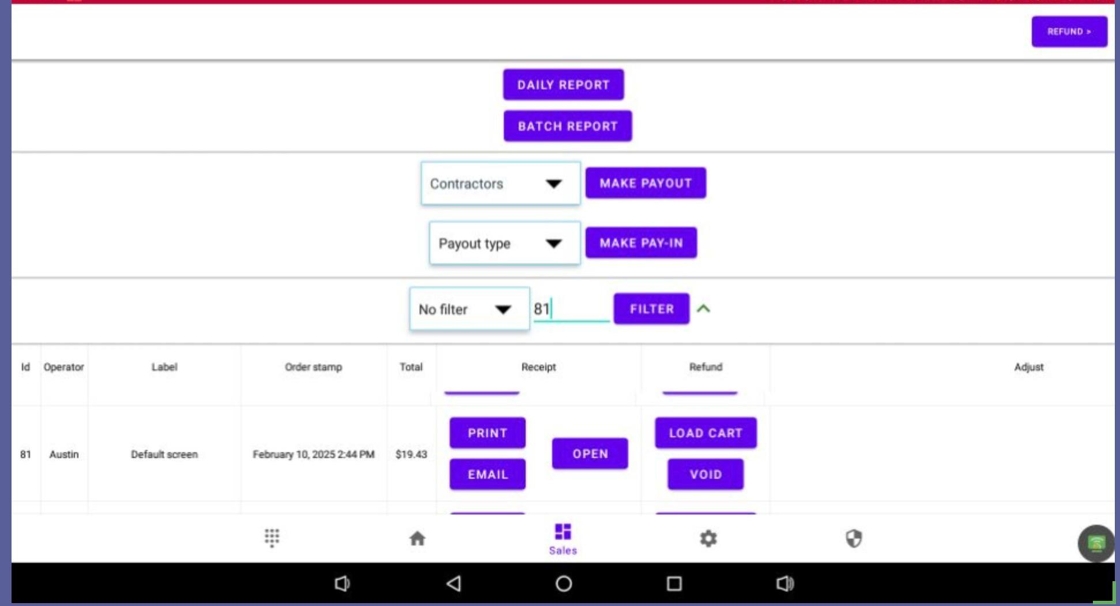
1. On the Lifelong POS register, click the Sales tab (four boxes icon) at the bottom of the screen to find a customer’s receipt.

Use Filters to Search Receipts #
2. Use the Filter dropdown menu to locate receipts.

Filtering Options #
3. Filter by:
- Terminal ID Ref #
- Auth Code
- Card Name
- Order ID – Most commonly used
- Order Total
- Customer Name

Load or Void a Transaction #
4. Click Load Cart to reopen the receipt or Void to cancel without a refund.
Confirm Void #
5. Click “Yes, Do it” when prompted.

Start the Refund #
6. Click Refund in the top-right corner.

Acknowledge the Prompt #
7. Read the prompt and click “Yes, I Understand”.

Proceed to Payment Screen #
8. Click Pay in the top-right to proceed.

Select Refund Method #
9. Choose a refund type:
- Cash Refund: Click Order Amount
- Card Refund: Click Start Refund

Finalize the Refund #
10. When refund shows $0.00, click Confirm to complete.

Print Receipt and Return to Register #
11. Print or email the receipt, then click Next Order to go back to the register.

Related Guides #
12. Other related links:


