
Inventory: Mass Actions For Items / Products in Lifelong POS – Delete Tier Pricing #
Let’s learn how to change multiple products with mass actions on the Point Of Sale register #
Follow the step-by-step instructions below.
Navigate to the Lifelong POS login page #
Visit https://login.lifelongpos.com/ on any web browser.

Click the “Items” tab on the left-hand side #

Search for a product name #
Click the “Search” field at the top right of the page.

Enter product name in the search bar #
Type in the product name (e.g., RAZ LTX) and press enter or click the magnifying glass icon.
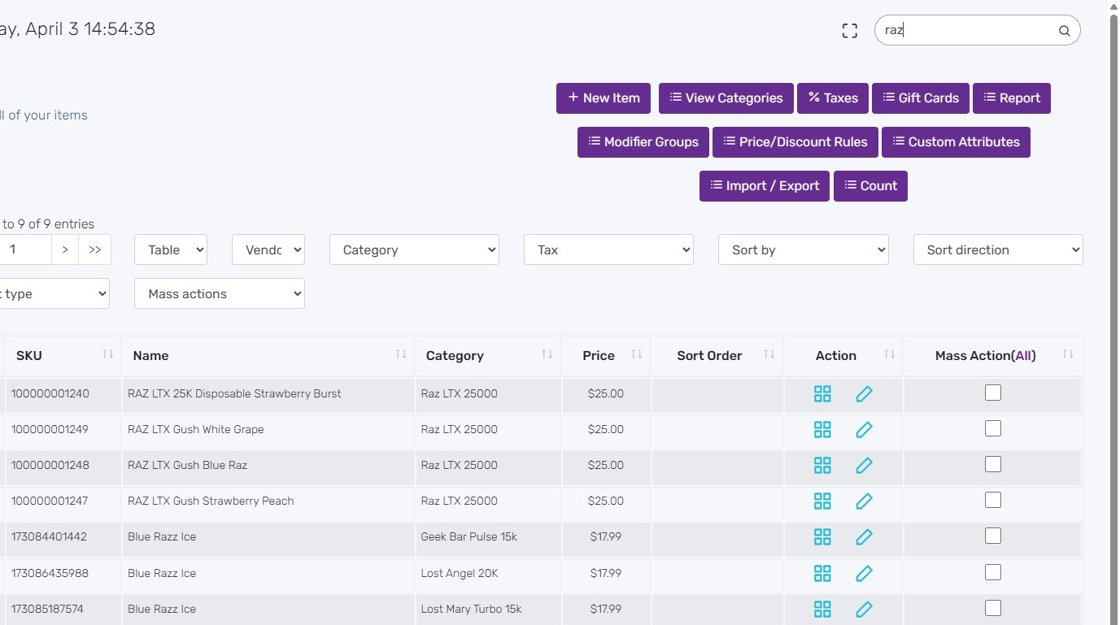
Select items for mass action #
Click on “All” to select all items or select specific ones.

Ensure all selected items are ready for mass action #

Open the Mass Actions dropdown #
Select “Delete Tier Price” from the list.

Delete tier pricing #
Confirm deletion by clicking OK. This will remove any tier pricing (e.g., by quantity) from the selected products.

Tier pricing removed #
The selected products have had their quantity-based tier pricing successfully deleted.
Other Available Mass Actions #
- Print Labels / Click Here for instructions
- Print Labels (2x) / Click Here for instructions
- Print Custom Labels / Click Here for instructions
- Update Vendor Information / Click Here for instructions
- Update Tax Class / Click Here for instructions
- Update Category / Click Here for instructions
- Update Product Price / Click Here for instructions
- Update Price to Cost + Markup / Click Here for instructions
- Update Product Name / Click Here for instructions
- Update Product Name & Price by percentage / Click Here for instructions
- Update Product Cost / Click Here for instructions
- Update Low Stock Quantity / Click Here for instructions
- Update Low Stock Quantity by Location / Click Here for instructions
- Update Product Quantity / Click Here for instructions
- Update Mod Groups / Click Here for instructions
- Add Tier Pricing / Click Here for instructions
- Delete Tier Pricing / Click Here for instructions
- Quick Update / Click Here for instructionss
- Clone Item / Click Here for instructions
- Delete Item / Click Here for instructions


